Role
Lead Product Designer
sole designer
sole designer
I consolidated a confusing multi-PIN, multi-smart-card system into a single PIN per account for 300K+ users, and rebranded the product's core terminology to remove technical jargon people never understood. The goal was one clean mental model: one email, one account, one PIN.
Context: Digidentity is an eIDAS Qualified Trust Service Provider on the EU Trusted List, whose platform has created 25M+ verified identities across 180+ nationalities.
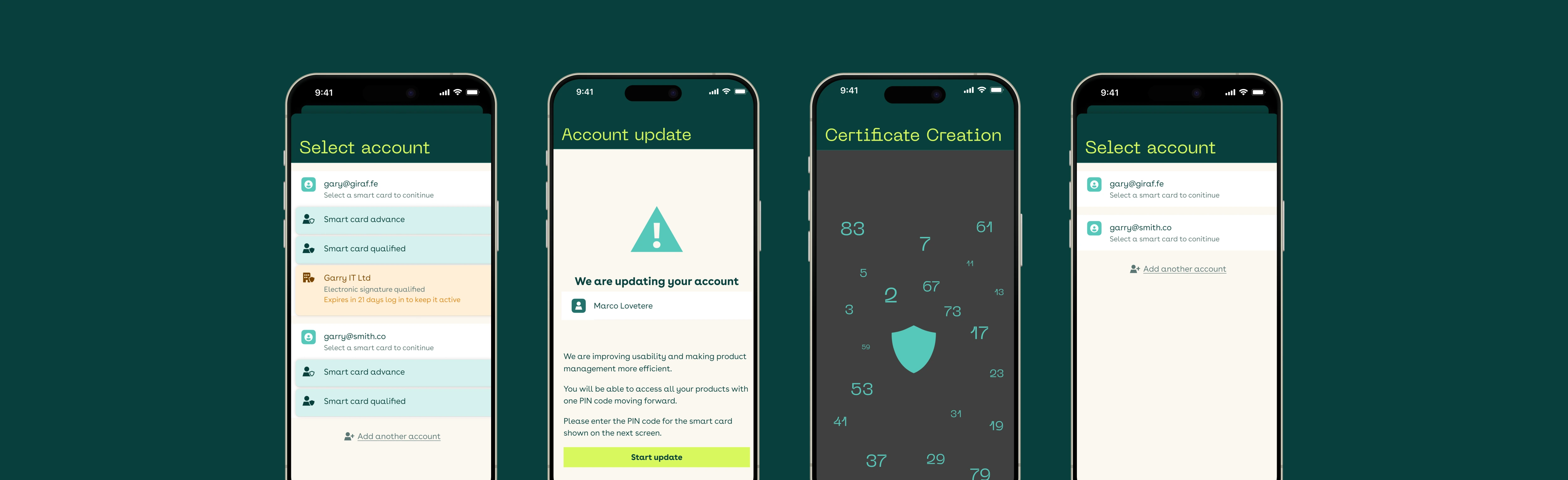
Digidentity's wallet let users accumulate a separate PIN for every smart card, even when those credentials were tied to the same email. The result was a confusing system where one person could end up juggling several PINs, and a login built around "smart card," a technical concept most users didn't understand or need.
For a product people use to prove who they are, that mismatch between the system's model and the user's mental model was a quiet but constant source of confusion and support tickets.
300K+ existing Digidentity wallet users on iOS and Android, individuals and business users who hold one or more credentials. Many didn't even realise they had multiple PINs; they just knew logging in sometimes felt inconsistent.
I was the sole designer. The security architecture underneath was not mine to change, so most of the design work was finding the user experience that architecture allowed.
I started by inventorying the full landscape: seven distinct user states across new and existing users — single account with one card, multiple accounts each with one card, one account with multiple cards, and so on — and mapped single-PIN eligibility for each. A scenario matrix made the old vs. new behaviour explicit for every case.
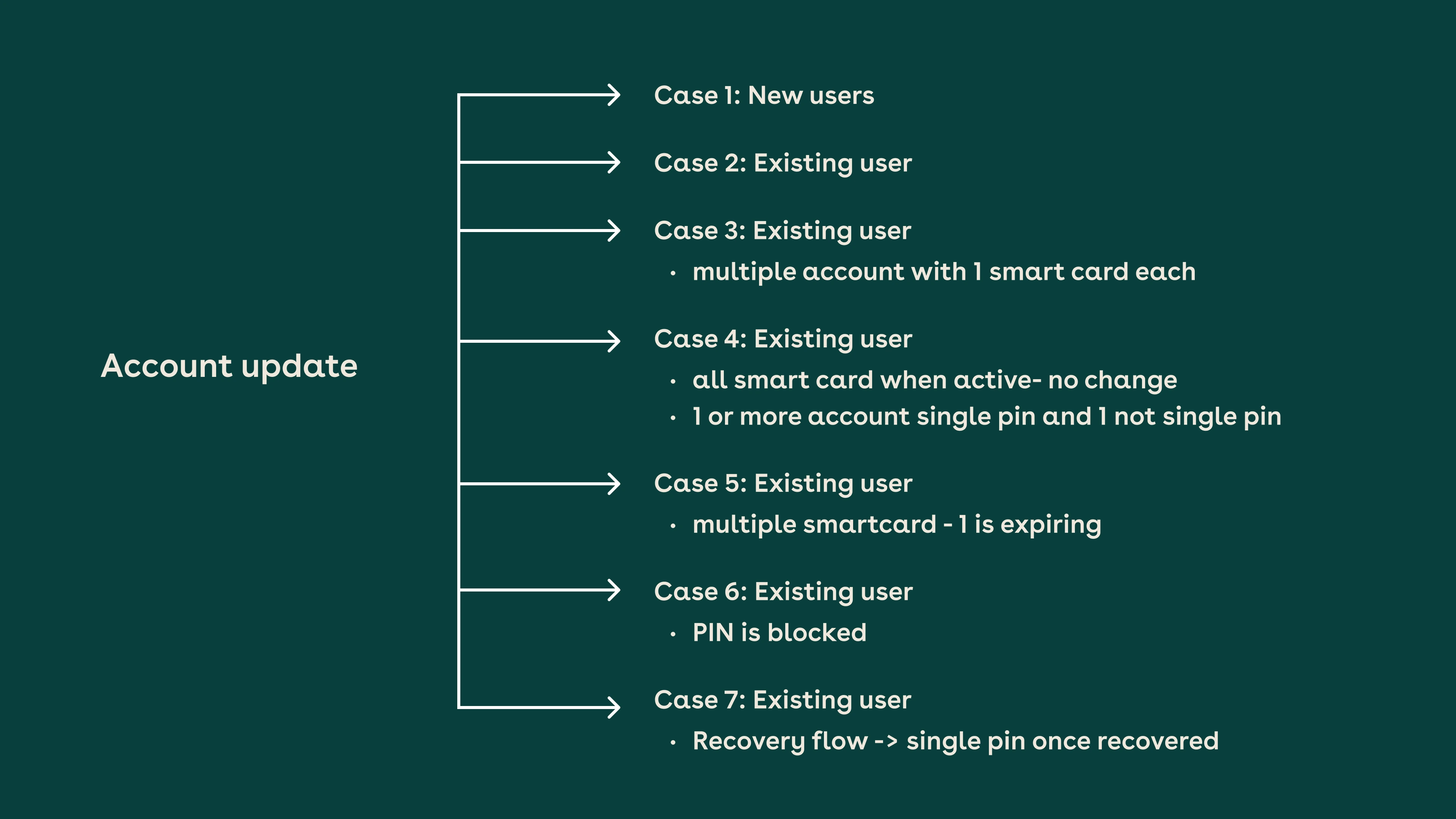
The migration was triggered by credential renewal, so users moved to a single PIN as a natural part of something they already do: no jarring forced reset. I designed both the happy and unhappy paths, including the tricky edge case where a PIN could diverge during recovery.
The brief looked like a relabelling job: "smart card" was confusing, so find a friendlier word. Early drafts treated it that way: swap the term, ship it.
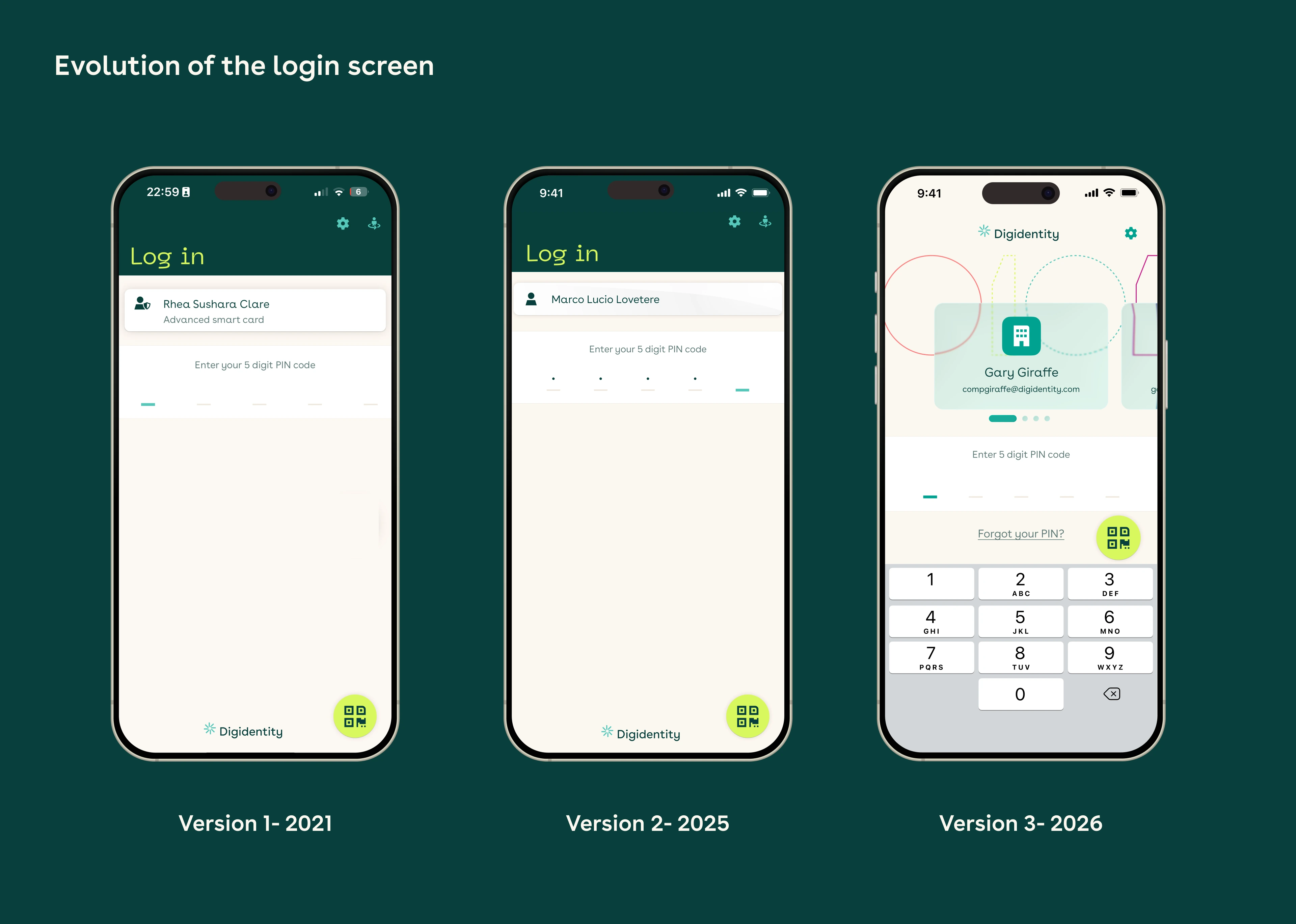
The real problem wasn't the word; it was the idea. Users didn't understand "smart card" and didn't need to. So instead of renaming it, I removed it from the login screen entirely and let the product speak in the model people already hold: one email = one account = one PIN. "Certificate" language now surfaces only where a legal or security requirement genuinely demands it, for example, upgrading to a higher assurance level like Level 4 eHerkenning.
On renewal, users migrate to a single PIN seamlessly. The happy path is calm and legible: log in → account updating → account active → wallet. The unhappy path went through a real revision post-launch: the first version offered a "try again" button on failure, but retrying just re-ran the same failed process. The shipped version instead lets users continue into the wallet with the affected product marked "incomplete," and finish the migration later from there. No dead end, and no button promising a fix that wasn't happening.
Access to clients for testing was limited, so I validated the migration flow and the new language through internal user acceptance testing with the service desk team, the people who fielded PIN and "smart card" confusion every day.
UAT caught a lot, but not everything: the broken "try again" state only surfaced once real accounts migrated in batches. That gap is exactly why I now watch the first live batch as closely as the design itself.
The word "smart card" disappears from every user-facing surface, replaced by "account." Underneath, the architecture doesn't change: each product is still tied to its own certificate (technically, a Level of Assurance certificate), and each certificate still holds its own PIN. What changes is what the user has to manage: instead of setting and remembering a separate PIN per smart card, they're guided to set the same PIN across every certificate they hold, so someone with three smart cards ends up with one PIN in practice, even though the backend still stores three. Anyone with genuinely separate accounts keeps a separate PIN per account: the consolidation happens within an account, not across them.
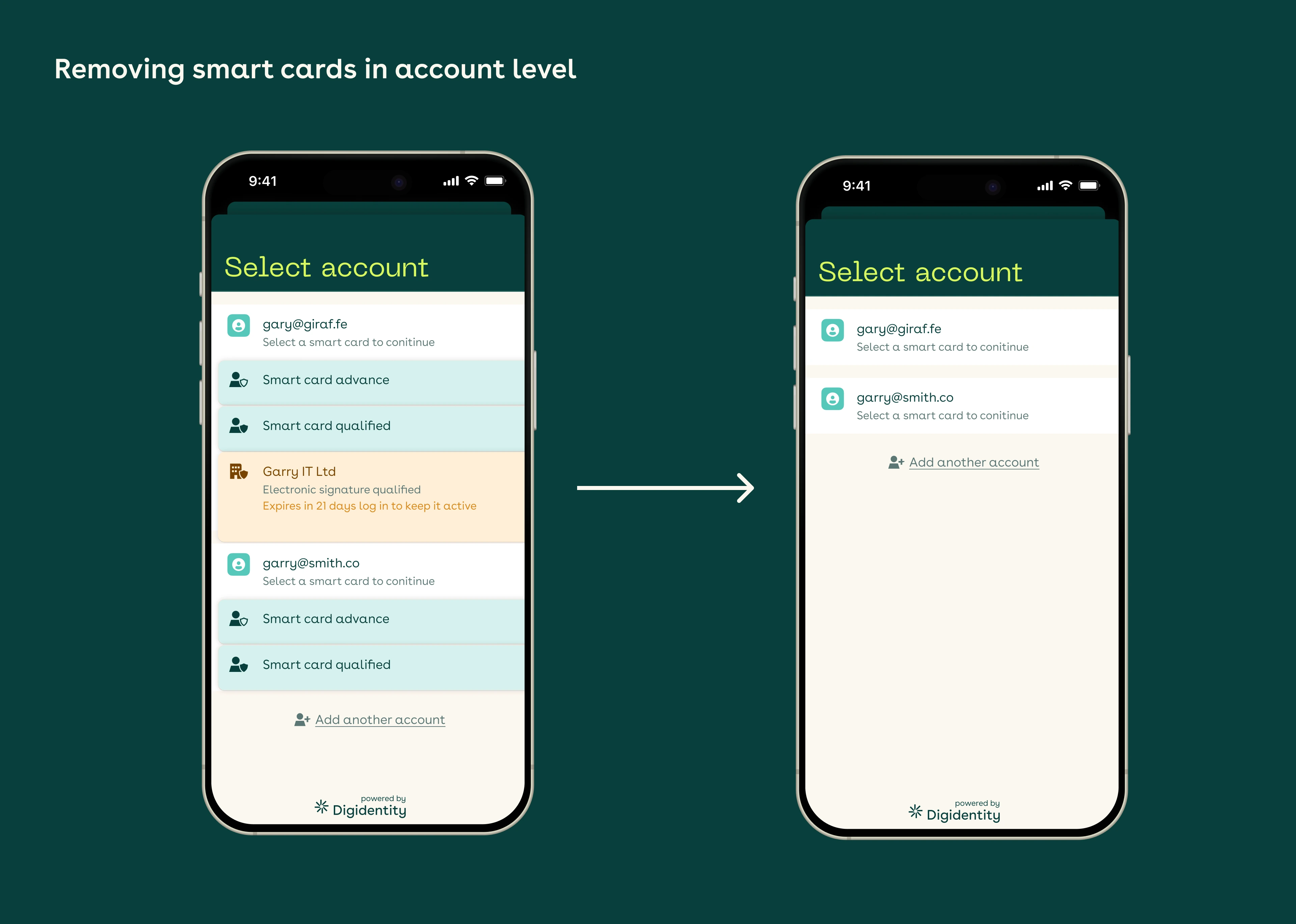
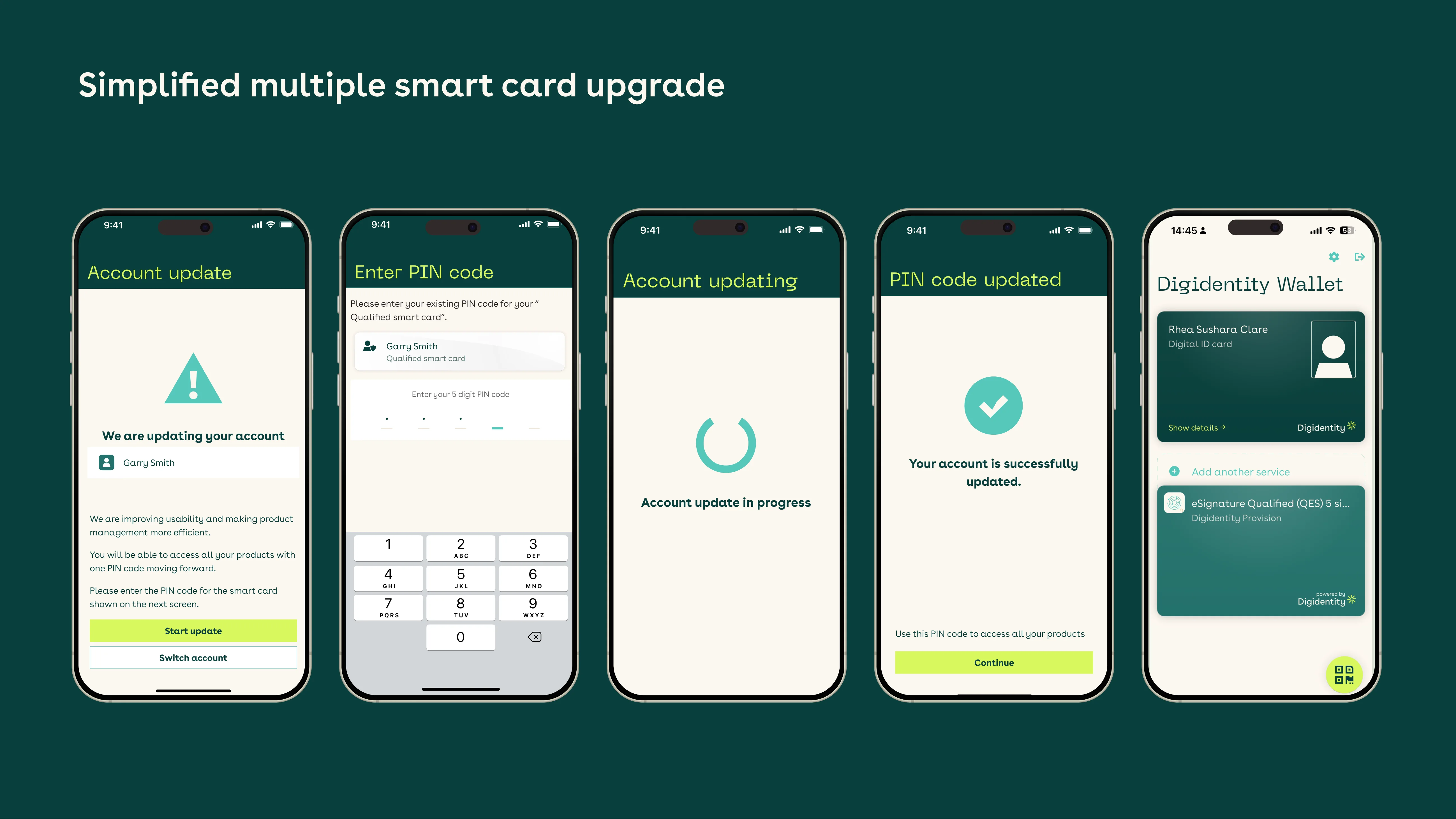
A single PIN per account for 300K+ users, and a login that finally matches how people actually think about their identity — one email, one account, one PIN — with the technical scaffolding tucked safely out of sight.
The number of users affected isn't proof of success, so here's what I can honestly evidence: the migration ran without a forced reset, and when the first batch exposed a broken failure state (5 support calls in the first 100 accounts), we caught it in that first batch and redesigned the failure state. I don't have an aggregate success metric for the full migration, so I don't claim one.
The unhappy path didn't work the way I first designed it. My initial version gave users a "try again" button when migration failed, based on early conversations with engineering, but once it rolled out in batches, "try again" turned out to do nothing: it just re-ran the same failed process. Of the first 100 accounts migrated, 5 called customer support before we caught it. I redesigned the failure state so users could continue into the wallet with the affected product marked "incomplete" and finish migration later, introducing a new incomplete-status model that wasn't in the original scope. The same gap put me in real friction with our Security & Compliance lead: my PO, tech lead, and I hadn't fully understood where certification logic actually lived in the architecture, and the upgrade sequencing had to be reworked because of it. The friction was fair, since we'd underestimated it going in. A multi-pseudonym / multi-device edge case can still cause PINs to diverge; solving it fully needs backend work in a future iteration. And "certificate," while clearer than "smart card," is still a compromise: ideally users would never need to see it at all.